Hugo Progression Framework
A Hugo template that renders progression frameworks using the same data format as the Monzo progression framework.
Hugo Progression is a Hugo template that can render progression frameworks using the same data format as the Monzo progression framework
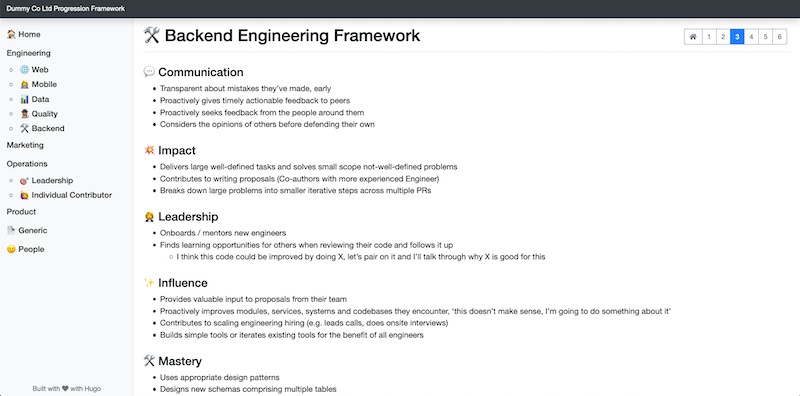
A full demo of this template (and the site contained within the exampleSite folder) can be found at the Hugo Progression Demo Site
What Are Progression Frameworks ?
A progression framework (or ‘competency matrix’, ‘career ladder’, ‘career pathway’) is a tool to help people within an organisation understand where they currently are and how to progress and grow in their work. It also helps an organisation map people’s competencies (their skills and knowledge) to compensation (how they’re rewarded for them financially).
When done right, a tool like this helps employees to grow and hone their strengths, and helps managers ensure that their organisations are in good shape and their employees happy.
Resources
- https://monzo.com/blog/2019/01/07/progression
- https://github.com/monzo/progression-framework
- https://www.progression.fyi/
How To Build Your Progression Framework With Hugo Progression
Everything discussed here can be found in the exampleSite folder within this repository.
1) Installation
Navigate to your themes folder in your Hugo site and use the following commands:
cd themes/
git clone https://github.com/leeturner/hugo-progression.git
If you don’t want to clone the theme you can add it as a git submodule. Inside the folder of your Hugo site run:
git submodule add https://github.com/leeturner/hugo-progression.git themes/hugo-progression
For more information read the official setup guide of Hugo.
2) Setup Your Framework Data & Content
Due to some restrictions in what data hugo allows in the markdown front matter along with how you reference data files in hugo, an individual framework needs to consist of 3 things:
- a markdown page that contains the homepage of the framework
- a data
ymlfile containing the content for each level of the framework - a hugo html partial that links the above together.
+-----------+       +------------+       +------------+          +-------------+
| Markdown  |       |    html    |       |  data yml  |          | Individual  |
|   file    |------>|   partial  |------>|    file    |     =    | Progression |
|           |       |            |       |            |          |  Framework  |
+-----------+       +------------+       +------------+          +-------------+
2.1) Create Your Framework Data Files
In this step we will create the hugo data file that contains the data for the different areas and levels for an individual framework. These data files are yml and follow the same format as the Monzo data files. A partial example of one of these data files is included below:
topics:
  - name: "communication"
    title: "💬 Communication"
    content:
      - level: 1
        criteria:
          - "Provides regular status updates to their mentor/buddy"
          - "Points out syntactical improvements in code reviews"
          - "Writes PR descriptions that provide basic context for the change"
          - "Seeks guidance from other engineers, rather than answers"
      - level: 2
        criteria:
          - "Proactively communicates to their team what they are working on, why, how it's going and what help they need"
          - "Accepts feedback graciously"
          - "Gives feedback to peers when asked"
        exampleCriteria:
          - criteria: "Provides helpful and actionable feedback in code reviews in an empathetic manner"
            examples:
              - "Take a look at the levelling up your code reviews talk for some ideas"
          - criteria: "Writes PR descriptions that provide context and provide rationale for significant decisions"
            examples:
              - "I decided to X instead of Y here, I also considered Z but for these reasons I went with X"
  - name: "impact"
    title: "💥 Impact"
    content:
      - level: 1
        criteria:
          - "Delivers assigned tasks, working with a more senior team member, and able to take PR feedback to improve their work"
      - level: 2
        criteria:
          - "Delivers assigned tasks that meet expected criteria"
          - "Works for the team, focuses on tasks that contribute to team goals"
          - "Tries to unblock themselves first before seeking help"
          - "Manages their own time effectively, prioritises their workload well, on time for meetings, aware when blocking others and unblocks"
          - "Helps the team, does what needs doing"
          - "Breaks down small/medium problems into iterative steps"
These framework data files need to be placed in the data folder for your hugo site. They can be structured into sub-folders if you wish:
data
  frameworks
    engineering
      backend.yml
      data.yml
      mobile.yml
      qualityanalyst.yml
      web.yml
    operations
      opsindividualcontributor.yml
      opsleadership.yml
    generic.yml
    marketing.yml
    people.yml
    product.yml
See the examples in the exampleSite folder if you want to see more complete examples.
2.2) Create The Markdown Page With Front Matter & Content For The Framework Homepage
For any of the frameworks to appear in your hugo site you will need a markdown file that contains the correct front matter and the content for the homepage of the individual framework. As with any hugo site, these markdown files live in the content folder. The front matter can contain all the usual hugo fields along with a couple of special fields specific to hugo-progression. See the example below:
---
title: 🛠️ Backend Engineering Framework
linktitle: 🛠️ Backend
description: Backend engineering progression framework
menu:
  main:
    parent: engineering
levels: 6
datafilepartial: engineering/backend-partial.html
---
The two fields that are specific to hugo-progression are levels and datafilepartial. The levels field specifies how many levels there are in this individual framework which must correspond to the number of levels in your framework yml data file. This will also determine how many levels are created in the menu when the site is generated:

The datafilepartial field links the markdown file to the specific html partial for this individual framework. We will create this html partial in the next step
See the examples in the exampleSite folder if you want to see more complete examples.
2.3) Create The HTML Partial
Because hugo won’t allow us to specify a data file in the front matter of a markdown file we have to create a simple hugo html partial file for each framework data file to get around this. If you want to understand more about this restriction in hugo take a look at this article by Michele Titolo which helped me understand how to work around it - https://michele.io/content-data-hugo/
I have tried to take out all the common elements make sure the html partial files are as small as possible, and the below example is as small as I could get it.
{{ $this_parent_index := .parent_index}}
{{ range .site_data.frameworks.engineering.backend.topics }}
{{ partial "topic-by-level.html" (dict "context" . "parent_index" $this_parent_index) }}
{{ end }}
As you can see, the one line that is specific to the data file is the range line:
{{ range .site_data.frameworks.engineering.backend.topics }}
This line will change for each of the html partial files but all the rest will stay the same. The path to the topics effectively matches the folder structure you used when you created your data files. To keep things consistent I store my html partials in the same directory structure as my data files:
layouts
  partials
    engineering
      backend-partial.html
      data-partial.html
      mobile-partial.html
      qualityanalyst-partial.html
      web-partial.html
    operations
      opsindividualcontributor-partial.html
      opsleadership-partial.html
    generic-partial.html
    marketing-partial.html
    people-partial.html
    product-partial.html
Once you have created your html partial file that references the framework data file, make sure you are correctly referencing the html partial in your markdown file as in the example above:
---
datafilepartial: engineering/backend-partial.html
---
See the examples in the exampleSite folder if you want to see more complete examples.
3) Nearly finished
In order to see your site in action, run Hugo’s built-in local server.
$ hugo server
Now enter localhost:1313 in the address bar of your browser.
Production
To run in production, run HUGO_ENV=production before your build command. For example:
HUGO_ENV=production hugo
Note: The above command will not work on Windows. If you are running a Windows OS, use the below command:
set HUGO_ENV=production
hugo
Contributing
If you find a bug or have an idea for a feature, feel free to use the issue tracker to let me know.
If you want to implement new features on the Hugo Progression template, please see the TODO file for ideas of where to start.